This is part 2 of How to Build a LangGraph Agent with FastAPI and SSE Streaming.
Now we have an agent and an HTTP API.
The next question is:
How do we send information back to the client while the agent is running?
This is where Server-Sent Events come in.
What Is SSE?
Server-Sent Events is a simple HTTP-based mechanism that allows a server to keep a connection open and send multiple events to a client over time.
A basic SSE response looks like this:
data: {"type": "start"}

data: {"type": "message", "content": "Hello"}

data: {"type": "done"}
Each event is separated by a blank line.
At the protocol level, the important part is:
data: <payload>\n\nThe connection remains open while the server continues producing events.
This makes SSE useful for AI applications where a single request may involve several steps before the final answer is available.
Why SSE Instead of a Normal JSON Response?
A traditional API endpoint follows a simple request-response model:
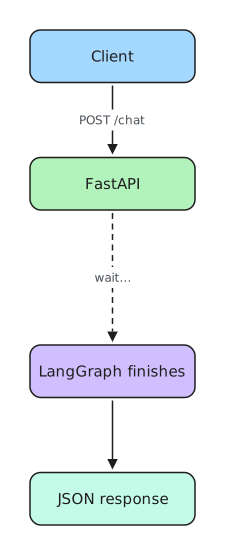
The client receives nothing until the entire operation is complete.
With SSE, the response becomes a stream:
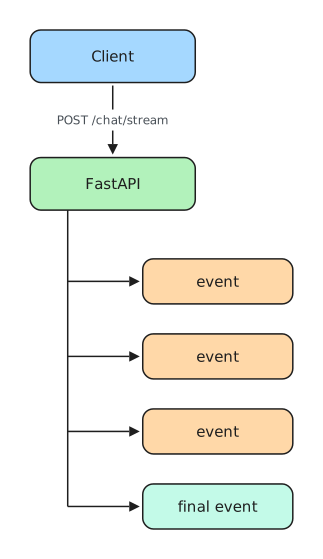
The HTTP request is still open, but data can arrive incrementally.
For agent applications, that creates an important architectural possibility: the backend can expose the progress of a multi-step execution instead of treating the agent as a black box.
Streaming from FastAPI
FastAPI can return a streaming HTTP response using StreamingResponse.
Conceptually, the pattern looks like this:
from fastapi.responses import StreamingResponse


async def event_stream():
    yield 'data: {"type": "start"}\n\n'

    # Run some asynchronous work here.

    yield 'data: {"type": "done"}\n\n'


return StreamingResponse(
    event_stream(),
    media_type="text/event-stream",
)
The key idea is that event_stream() is an asynchronous generator.
Instead of building the complete response in memory and returning it at once, the generator can yield pieces of the response as execution progresses.
FastAPI sends those pieces through the open HTTP connection.
That gives us this relationship:

For SSE, each yielded message follows the event-stream format.
Connecting the Stream to LangGraph
The useful part begins when the asynchronous generator is connected to the graph.
Instead of producing arbitrary messages, the endpoint runs the LangGraph workflow and converts relevant execution results into SSE messages.
Conceptually:
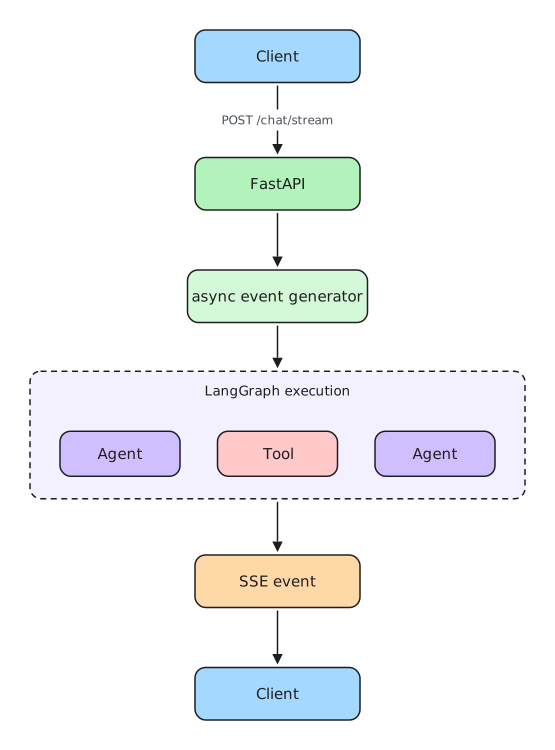
This separation is worth preserving.
LangGraph should not need to know anything about HTTP or SSE.
Likewise, the HTTP layer should not contain the reasoning logic of the agent.
The graph produces application behavior.
The API layer translates that behavior into a protocol the client can consume.
In simplified form:
async def event_stream():
    async for event in graph_execution:
        yield format_as_sse(event)
That small boundary is one of the most useful ideas in this architecture.
It means the same graph could later be consumed through another interface without rewriting the agent itself.
SSE Is Not Automatically Token Streaming
There is an important distinction here.
Streaming an HTTP response with SSE does not automatically mean that the language model is streaming tokens.
These are separate concerns.
SSE describes how the server sends data to the client.
LLM token streaming describes how model output becomes available during generation.
Consider these two architectures.
Event streaming

The client receives information when meaningful application events become available.
Token streaming
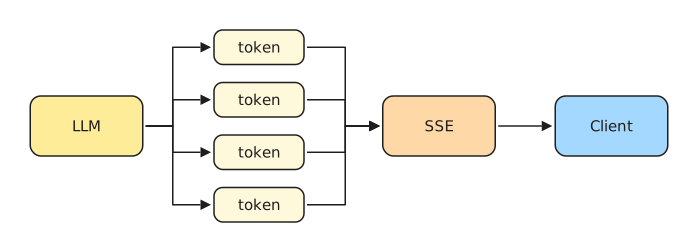
Here, pieces of the model's generated text are forwarded as they are produced.
Both approaches can use SSE.
But they are not the same thing.
This tutorial focuses on the streaming behavior implemented by the example application rather than claiming that every SSE message represents an individual model token.
That distinction becomes important when designing frontends and measuring perceived latency.
Why This Boundary Matters
It is tempting to put everything inside the FastAPI endpoint:
receive request
→ call model
→ decide tool
→ call API
→ call model again
→ format answer
→ stream response
That works for very small applications.
But it quickly becomes difficult to maintain.
With LangGraph, orchestration stays inside the graph:
LangGraph
   │
   ├── reasoning
   ├── tool decisions
   ├── tool execution
   └── state transitions
FastAPI remains responsible for transport:
FastAPI
   │
   ├── request validation
   ├── HTTP endpoint
   └── streaming response
And SSE remains responsible for delivering incremental information:
SSE
   │
   └── server → client events
The complete architecture now becomes:
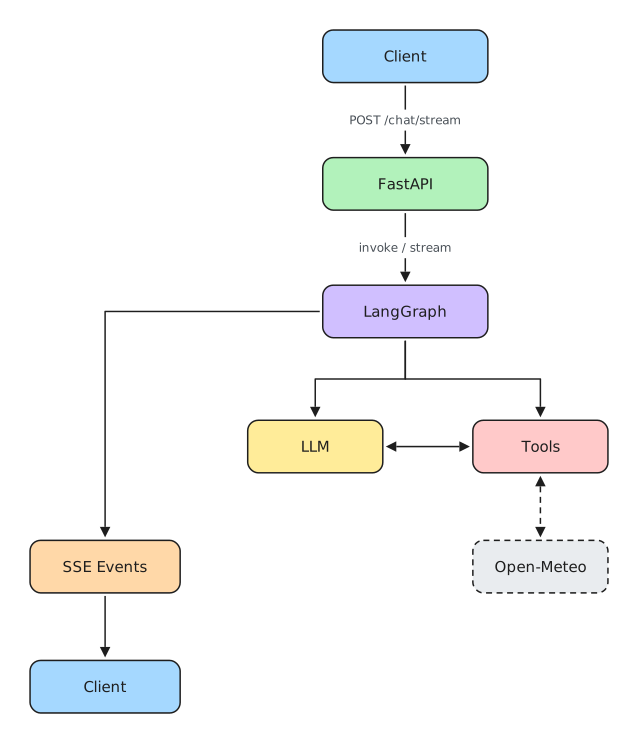
At this point, all the main pieces are connected.
Now we can run the application and watch the complete request flow.
Running the Application
After cloning the companion repository, install the project dependencies and configure the environment required by the application.
Then start the FastAPI server.
Once the API is running, you can test the regular chat endpoint first.
This is useful because it separates two questions:
- Does the agent work?
- Does streaming work?
If the normal JSON endpoint works but the streaming endpoint does not, the problem is probably in the HTTP streaming layer rather than in the graph itself.
That is a useful debugging pattern for agent applications:

Validate each layer before adding the next one.
Testing the SSE Endpoint
You can then send a request to the streaming endpoint using a client that displays the response as it arrives.
curl is particularly useful for this because it lets you inspect the raw HTTP stream without introducing frontend code.
Conceptually:
curl -N \
  -X POST \
  -H "Content-Type: application/json" \
  -d '{"message":"What is the weather in São Paulo?"}' \
  http://localhost:8000/chat/stream
The -N option disables curl's output buffering, making streamed data visible as it arrives.
Instead of receiving one JSON document after the request finishes, you should see SSE-formatted messages arriving through the same connection.
This is useful for another reason: it exposes the protocol directly.
Before writing JavaScript, React hooks, loading indicators, or chat components, you can verify that the backend is actually producing a valid stream.
Following a Request End to End
Now consider what happens when the user asks:
What is the weather in São Paulo?The request first reaches FastAPI.
User
  │
  ▼
POST /chat/stream
FastAPI validates the request and starts the streaming response.
POST /chat/stream
       │
       ▼
StreamingResponse
The message is passed into the LangGraph application.
StreamingResponse
       │
       ▼
LangGraph
The agent node sends the current conversation state to the model.
The model recognizes that answering the question requires current weather information and requests the weather tool.
LLM
 │
 │ tool request
 ▼
get_weather
The tool retrieves the external information through Open-Meteo.
get_weather
     │
     ▼
Open-Meteo
     │
     ▼
weather data
The result returns to the graph and becomes part of the conversation state.
The model can now generate an answer using information obtained by the tool.
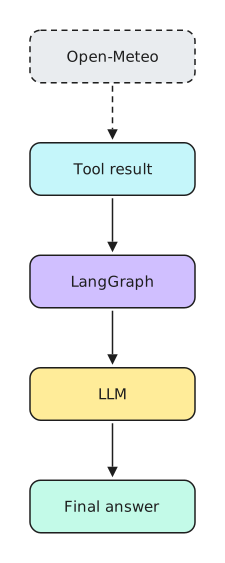
The API layer converts the relevant output into SSE-formatted data and sends it through the open HTTP connection.
Final answer
     │
     ▼
SSE
     │
     ▼
Client
We have now connected all four layers:
HTTP
  +
LangGraph orchestration
  +
real tool execution
  +
streaming transport
That is the core architecture of the example.
But it is equally important to understand what this architecture does not provide yet.
What This Example Does Not Do Yet
The application is intentionally small.
That makes it useful for understanding the architecture, but it also means several concerns required by real production systems are outside the scope of this tutorial.
Authentication and Authorization
The API does not represent a complete security boundary for a multi-user application.
A production service would normally need to identify callers and determine which agents, tools, conversations, and resources each user is allowed to access.
This becomes especially important when tools can perform actions instead of simply retrieving public information.
Persistent Conversation State
The example should not be treated as a complete conversation persistence architecture.
Real applications often need durable state so conversations can survive process restarts, scale across workers, or be resumed later.
LangGraph provides mechanisms that can participate in persistence strategies, but choosing and operating that persistence layer is a separate architectural decision.
Production Error Handling
External systems fail.
Models can time out.
APIs can return unexpected responses.
Clients can disconnect while a stream is active.
Production code needs explicit handling for those failure modes and should expose errors through a predictable event contract.
Retries and Timeouts
Calling an external service without a deliberate timeout and retry strategy can create cascading problems under load.
Production integrations generally need policies for:
timeouts
retries
backoff
rate limits
circuit breaking
The correct policy depends on the operation.
Retrying a weather lookup and retrying a tool that creates a financial transaction are very different decisions.
Observability
Once an agent has multiple steps, logs containing only the final answer are not enough.
A production system usually needs visibility into:
request
→ graph execution
→ model calls
→ tool calls
→ latency
→ errors
→ final outcome
Tracing becomes particularly valuable when the model dynamically chooses which tools to execute.
Scalability
A locally running FastAPI process is not a deployment architecture by itself.
Long-lived streaming connections affect server resources, worker configuration, proxies, load balancers, and deployment platforms.
Those constraints need to be considered before exposing SSE endpoints at scale.
A Stable Event Contract
As soon as a frontend depends on the stream, SSE events become an API contract.
Instead of emitting arbitrary payloads, a larger application will usually benefit from explicit event types such as:
{"type": "started"}{"type": "tool_started", "tool": "get_weather"}{"type": "tool_completed", "tool": "get_weather"}{"type": "message", "content": "..."}{"type": "completed"}{"type": "error", "message": "..."}The exact schema is application-specific.
The important point is that the stream itself should eventually be treated as a versioned interface between backend and client.
From Example to Production Architecture
The example gives us a useful foundation:
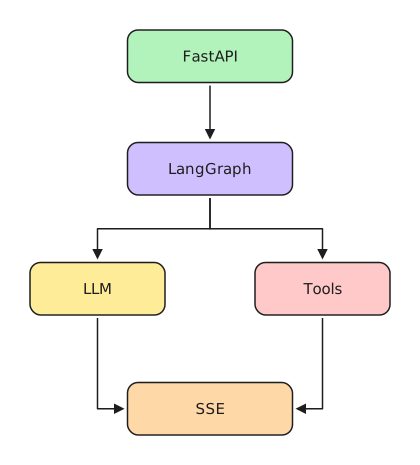
A more complete system might eventually evolve toward something like:
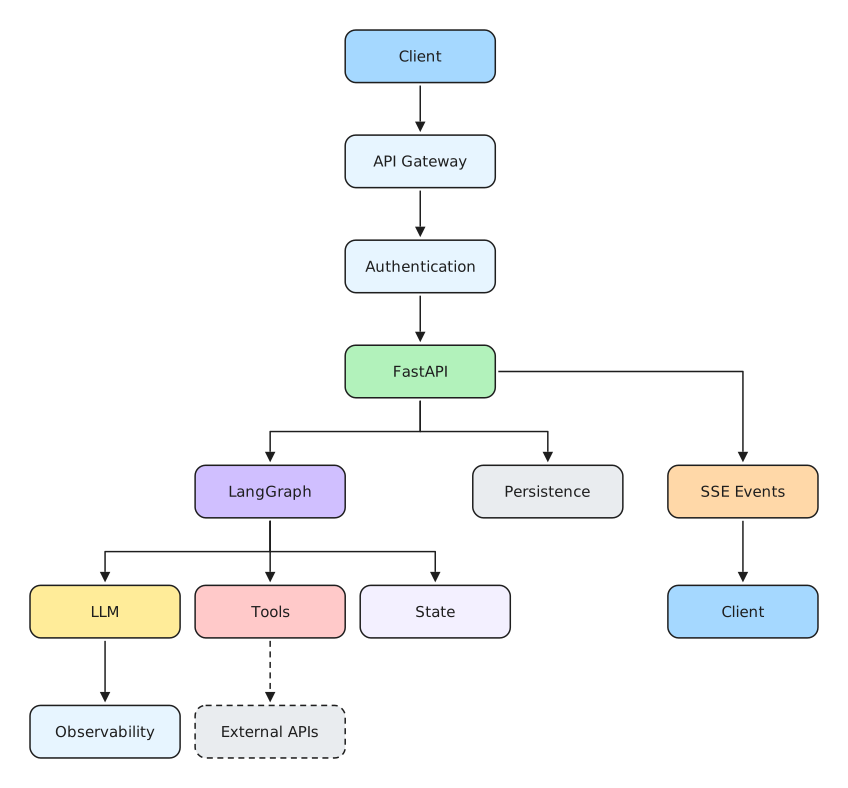
You should not build all of this before you need it.
The value of the small example is precisely that it lets us understand the core execution path first.
Once that path is clear, production capabilities can be added because a concrete requirement demands them—not simply because they appear on an architecture diagram.
Where to Go Next
We started with a simple goal:
Expose a LangGraph agent through FastAPI and stream its execution through Server-Sent Events.
Along the way, we separated the application into clear responsibilities.
LangGraph manages the agent workflow.
Tools connect the model to external capabilities.
FastAPI provides the HTTP boundary.
SSE gives the server a simple mechanism for sending incremental events back to the client.
The resulting architecture is small enough to understand but useful enough to serve as the starting point for more capable agent applications.
From here, useful extensions include persistent conversation state, structured SSE event schemas, authentication, better failure handling, observability, additional tools, and—when the user experience requires it—true model token streaming.
The important part is not adding all of those features immediately.
It is understanding where each one belongs.
That is what makes the architecture extensible.
Source Code
The complete working example used in this tutorial is available on GitHub:
salada-dados/langgraph-fastapi-example
Clone it, run it locally, change the tool, inspect the SSE stream, and then start modifying the graph.
Reading an agent architecture is useful.
Breaking one and rebuilding it is usually where the real understanding begins.
Your Agent Works. Now What Happens in Production?
At this point, the agent works.
It can call a real tool, expose an API through FastAPI, and stream events back to the client.
But getting an agent to work is only the beginning.
What happens when the LLM times out?
What if a tool fails halfway through execution?
What if a retry runs the same tool twice?
Where does conversation state live when the process restarts?
What happens when the client disconnects during a long-running request?
And when something goes wrong, how do you figure out what the agent actually did?
These are different problems from building the agent itself.
They are production engineering problems.
At Salada de Dados, that's the next layer we're exploring: how to take AI agents that work locally and make them reliable enough to run in real systems.
We'll focus on problems such as:
- state and persistence;
- failures and retries;
- idempotency;
- observability and debugging;
- streaming and interrupted connections;
- testing and evaluation;
- security and deployment.
And we're approaching them with the same principle as this tutorial: working implementations first, architecture explained from the code — not abstract diagrams.
If you're building AI agents and starting to face these problems, join the Salada de Dados Early Access.
We're using Early Access to understand which production problems developers are struggling with most and to shape what we build next.
Your AI can help you write the agent.
The next challenge is making it survive production.