Building an AI agent is relatively easy.
Building one that can use tools, expose an API, and stream what is happening back to a client requires a few more pieces.
In this tutorial, we’ll build a small but complete example using LangGraph, FastAPI, and Server-Sent Events (SSE).
The agent will be able to receive a user request, decide whether it needs a tool, call a real weather API when necessary, and return the result through a streaming HTTP endpoint.
The architecture will look like this:
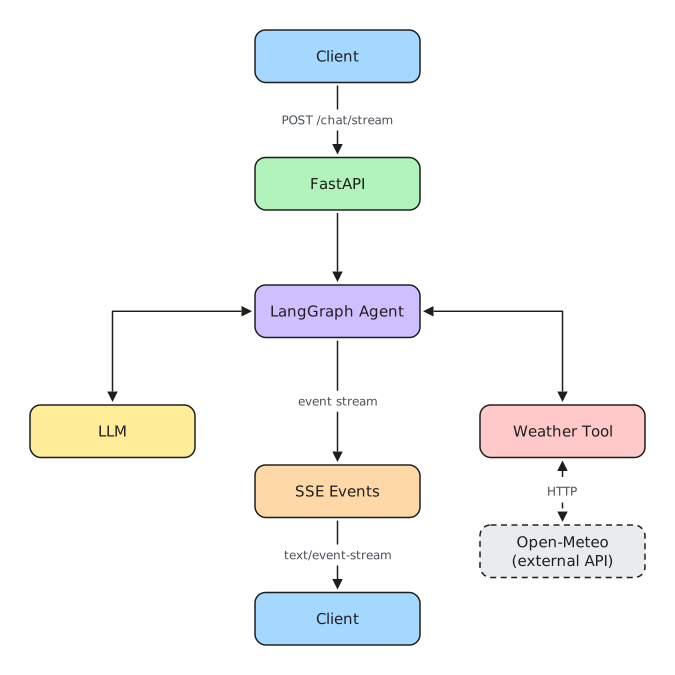
The goal is not to build a production platform.
Instead, we’ll focus on the smallest architecture that demonstrates how these components fit together in a real, executable application.
By the end, you’ll have a working foundation that you can run locally and extend with your own tools, state, persistence, authentication, or frontend.
The complete source code is available in the companion repository:
salada-dados/langgraph-fastapi-example
What We’re Building
Our application has three main responsibilities.
First, LangGraph orchestrates the agent.
It receives the conversation state, calls the language model, determines whether a tool needs to be executed, runs the tool when necessary, and then returns control to the model.
Second, FastAPI exposes the agent through HTTP.
Instead of calling the graph directly from a Python script, clients can interact with it through an API endpoint.
Third, Server-Sent Events allow the server to send multiple events over the same HTTP response.
This gives us a simple streaming interface between the backend and any client consuming the agent.
Conceptually, a request follows this path:
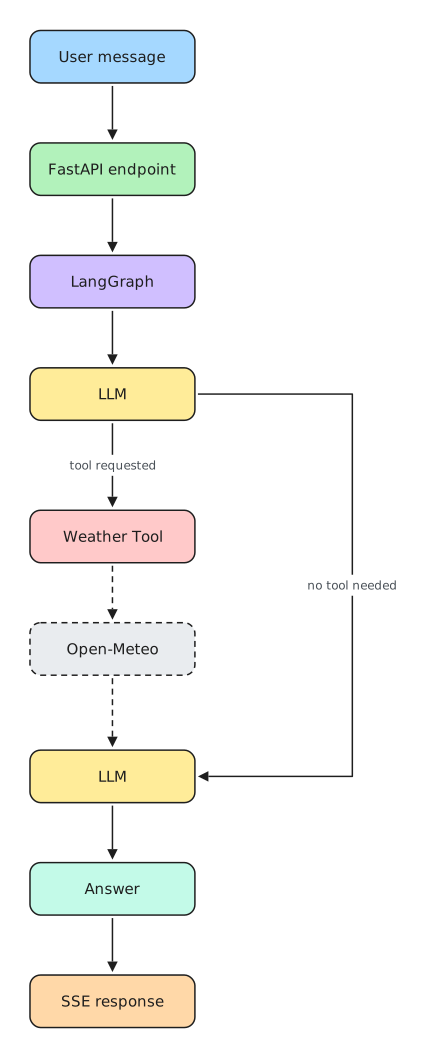
This is deliberately a small example, but the same separation of responsibilities becomes useful in larger agent systems.
The graph owns orchestration.
Tools own interactions with external capabilities.
FastAPI owns the HTTP interface.
And SSE provides the transport for streaming updates back to the client.
Keeping those responsibilities separate will also make the example easier to extend later.
Project Structure
The application keeps the API, agent, and tool responsibilities separated.
A simplified view of the project looks like this:
app/
├── agents/
│   ├── graph.py
|   ├── state.py
│   └── tools.py
│
├── api/
│   └── ...
│
└── main.py
The exact files in the repository provide the complete implementation, but the important architectural distinction is between the agent graph and the tools available to that graph.
graph.py is responsible for assembling the LangGraph agent.
tools.py contains the external capabilities the model can invoke.
This separation matters more than it may initially appear.
As an agent grows, the graph should describe how execution flows, while individual tools should describe what external actions are available.
A weather API, database query, document search, or third-party service integration should not need to know how the graph itself is orchestrated.
That gives us a dependency direction roughly like this:
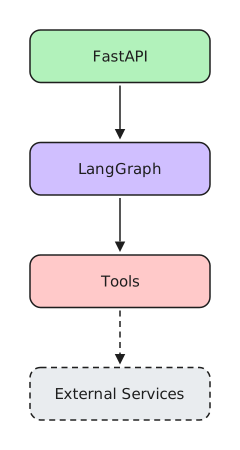
For this tutorial, our external service is Open-Meteo.
Creating a Real Tool with Open-Meteo
A tool becomes interesting when it connects the model to information the model does not already have.
Weather is a good example.
A language model can understand a question such as:
What's the weather in São Paulo?
But it cannot reliably know the current weather from its model weights.
That information needs to come from an external source.
Our agent therefore exposes a weather tool that uses Open-Meteo.
The important idea is not weather itself. It is the boundary we are creating:
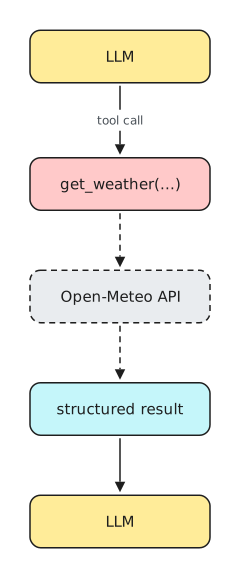
The model does not make arbitrary HTTP requests.
Instead, we give it a controlled capability with a defined interface.
In the project, the weather implementation lives in:
app/agents/tools.py
The module also exposes the collection of tools available to the agent.
Conceptually:
TOOLS = [
    get_weather,
]
Later, when we create the model, this tool collection will be bound to it.
That is the bridge between natural-language reasoning and executable code.
The model can decide:
I need weather information to answer this question.
But the application remains responsible for determining what capability actually exists and what code is allowed to execute.
This distinction becomes increasingly important when tools do more than retrieve public information.
A production agent might eventually have tools capable of:
search_documents
query_database
create_ticket
send_email
update_customer
schedule_job
At that point, tool design becomes part of the application's security and domain architecture—not merely an LLM feature.
For our example, however, we intentionally keep the tool simple.
It gives us a real external call without distracting from the LangGraph execution flow.
Building the LangGraph Agent
Now we can connect the language model and our tools.
LangGraph models an agent as a graph of execution.
Instead of thinking only in terms of:

we can represent a workflow in which execution may move between different nodes.
Our example needs two important capabilities:

The first node invokes the language model.
The second executes requested tools.
After a tool runs, control returns to the model so it can interpret the result and produce the final answer.
This creates the basic agent loop:
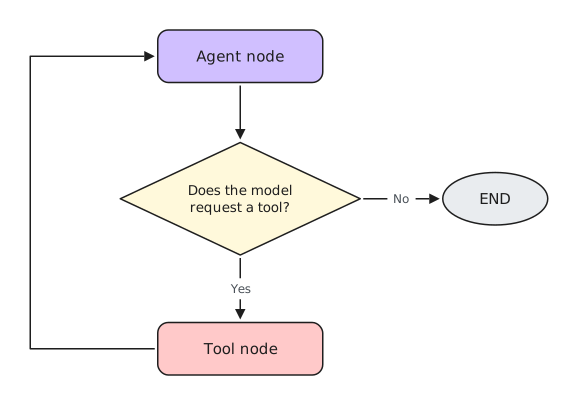
LangGraph gives us an explicit way to represent that loop rather than hiding it inside a single opaque agent call.
That explicit execution model becomes especially useful as workflows grow.
For example, a larger graph might eventually look like:
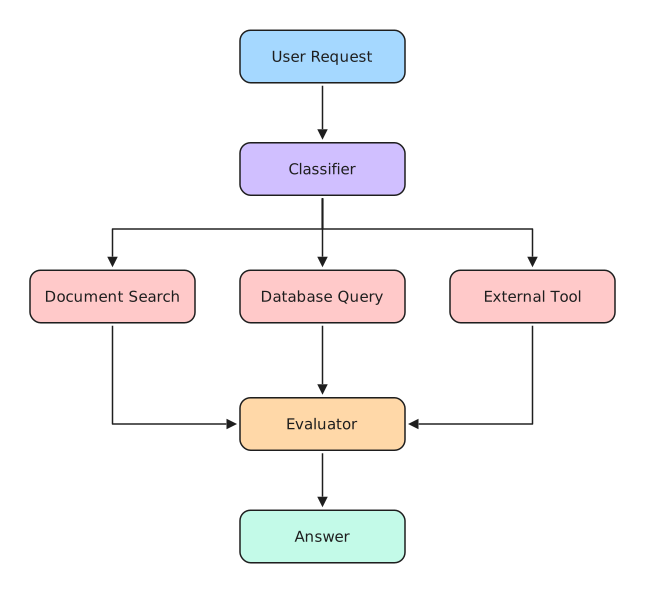
We do not need that complexity here.
The important thing is understanding the foundation first:
state moves through nodes, nodes perform work, and edges determine where execution goes next.
Once that graph is working, the next challenge is making it available outside Python.
That is where FastAPI enters the architecture.
Why Put FastAPI in Front of LangGraph?
A LangGraph application can run perfectly well inside a Python process.
But most useful agents eventually need to communicate with something else:
-
a web application;
-
a mobile app;
-
another backend service;
-
an automation;
-
or another agent.
That means we need an application boundary.
FastAPI gives us that boundary.
Instead of coupling a client directly to LangGraph, we expose an HTTP contract:
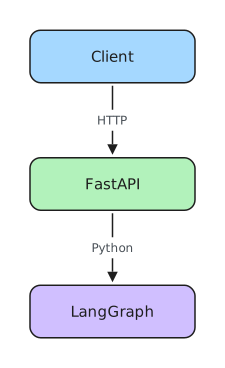
This separation has an important consequence.
The client does not need to know that LangGraph exists.
It only needs to understand the API.
That leaves us free to change the internal graph without necessarily changing every consumer of the application.
But there is still one problem.
Agent execution is not always instantaneous.
A request may involve:
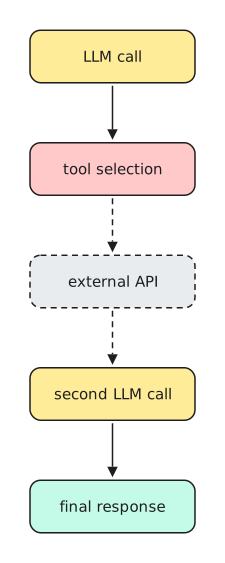
If we treat that as a conventional HTTP request, the client may simply wait until everything finishes.
For a small demo that may be acceptable.
For an interactive AI application, it is usually not a great experience.
We want the server to be able to send information while the request is still running.
That brings us to the central integration in this tutorial:
FastAPI + Server-Sent Events + LangGraph.