
In the previous post, the RAG series' MCP server went into Claude Code and Claude Desktop. It worked, but only where Claude runs on your machine. To use the same server in Claude in the browser or on your phone, it has to be on the internet: with HTTPS, a public address and, like anything open on the internet, authentication.
That is what we did here. The server left the computer for a Vercel function, the database moved to Neon, and Claude on the web started asking for a password before using the tools. All on free plans.
The road had more stumbles than the code suggests. The embedding model did not fit in the function. The ready-made compact version of the model brought back other chunks of the report. The SDK's default protection would have refused every call from outside. Claude's first three searches failed for lack of disk space. And, even with everything working, Claude sometimes preferred to search the web.
The code is at salada-dados/blog, in the rag-mcp-remote folder. The screenshots are from Claude in Portuguese.
What changes when the server leaves your machine
In Desktop, Claude starts the server as a local process and talks to it through standard input and output (stdio). In Claude on the web, the server is called by Anthropic's computers, over the internet. So the server has to:
- speak HTTP, in the transport MCP calls Streamable HTTP;
- live at a public HTTPS address;
- have authentication, or anyone who finds the address uses your tools, and your account picks up the bill.
The two tools stay the same: search_report finds the 3 chunks most similar to the question, and view_page returns the report's page as an image. The only change is that both now take lang (pt or en), so one connector serves both editions of the report.
From stdio to HTTP, keeping nothing
In a serverless function like Vercel's, each request may land on a different instance, and nothing guarantees the next call finds the previous one. So the server keeps no session between calls and answers in plain JSON:
app = mcp.streamable_http_app(
    stateless_http=True,
    json_response=True,
    transport_security=TransportSecuritySettings(enable_dns_rebinding_protection=False),
)
The third line deserves an explanation, and it comes back later. With the SDK's default, we tested a call addressed to blog-mcp-steel.vercel.app, and the answer was 421 Invalid Host header.
The model did not fit
Vercel accepts Python functions of up to 500 MB. PyTorch alone, which the server used to turn the question into a vector, is larger than that. The way out was to run the same model (multilingual-e5-small) with ONNX Runtime, which does not need PyTorch.
Hugging Face already offers the model in ONNX, in several sizes. The detail that matters: the index in the database was built with the original model, and the question's vector has to "speak the same language" as the index's vectors. To check, we used the series' 33 questions, in Portuguese and in English, and compared the 3 chunks each version retrieves with the ones the original model retrieves:
| Model version | Size | Same 3 chunks (of 66) |
|---|---|---|
| Original ONNX (fp32) | 470 MB | 66 |
| Hugging Face's ready-made int8 | 118 MB | 45 |
| Hugging Face's ready-made fp16 | 235 MB | 65 |
| int8 only in the vocabulary table | 183 MB | 66 |
The ready-made int8 version looked great: the mean cosine between its vectors and the original's was 0.996, which sounds like "practically the same". But it brought back other chunks in 21 of the 66 questions. To use it, the whole index would have to be rebuilt. A high cosine does not guarantee that the search returns the same chunks.
The fix came from looking inside the model. The vocabulary table, with one vector for each of 250,000 tokens, holds 96 of the 117.5 million parameters. We stored only that table as int8, with one scale per row, and left the rest in fp32. The file went from 470 to 183 MB, and the chunks were the same in all 66 questions. The script that builds the file (build_model.py) and the one that runs the comparison (check_model.py) are in the repository.
As a bonus, the server got lighter. Measured on our machine, from start to the first answer (one search and one page):
| Server | Memory | Time |
|---|---|---|
| With PyTorch (the previous post's) | 1,285 MB | 19.5 s |
| With ONNX | 571 MB | 3.0 s |
Large files stay out of Git
The 183 MB model does not fit on GitHub, which refuses files over 100 MB. It does not fit a deploy through Vercel's CLI either, limited to 100 MB on the free plan. It became an asset of a GitHub release, which takes up to 2 GB per file, and the server downloads it on the first search, checking its hash.
The report's PDFs follow the series' rule: they are not in the repository. The server downloads them straight from the Banco Central do Brasil's website the first time someone asks for a page, also checking the hash.
Authentication: one password, no database
This is the part that matters most. An MCP server on the internet without authentication is open to anyone who finds the address. Here the damage would be small, because the document is public and the tools only read. But whoever uses it spends your Vercel limits and your database. With private documents, it would be a leak.
Claude on the web accepts connectors with no authentication or with OAuth. There is a field to send a fixed token in a header, but it is a beta feature that does not show up for every account. To work with any account, the way is OAuth.
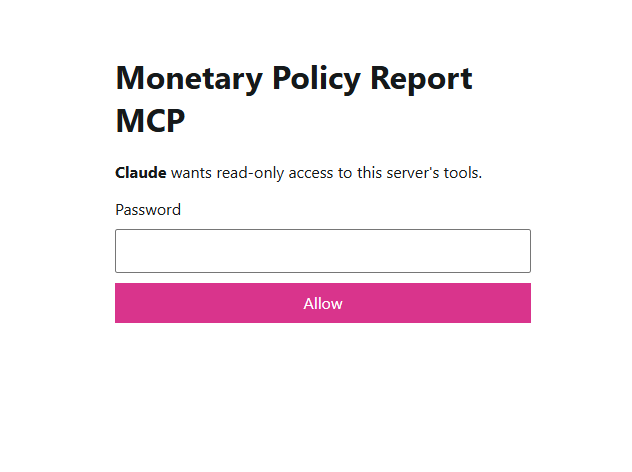
OAuth tends to scare people, because it brings to mind "Sign in with Google" and a whole identity server. But the MCP spec lets the server itself play the authorization server. The Python SDK already sets up the flow's endpoints: /register, /authorize, /token and the metadata Claude reads to find out how to sign in. What is left is deciding who gets in. Here, whoever knows the password:
The problem with keeping things in memory
The SDK's OAuth example keeps registered clients, authorization codes and tokens in dictionaries in the server's memory. On Vercel that breaks: Claude registers on one instance, exchanges the code for a token on another, and the second one does not know the client.
The way out was to keep nothing. Every piece of information the flow needs becomes a message signed with a secret key (AUTH_SECRET), which any instance can check:
def sign(kind, data, ttl=None):
    """A message only this server could have written. kind is signed too, so a refresh token
    cannot pass as an access token, nor a client_id as an authorization code."""
    payload = {**data, "kind": kind}
    if ttl:
        payload["exp"] = int(time.time()) + ttl
    body = _b64(json.dumps(payload, separators=(",", ":")).encode())
    mac = _b64(hmac.new(_key(), f"{kind}.{body}".encode(), hashlib.sha256).digest())
    return f"{body}.{mac}"
The client_id Claude gets when it registers carries, signed, its callback addresses. The authorization code carries the PKCE challenge. The access token carries its expiry, one hour. None of them needs a database.
This design has costs, and they are worth stating:
- A single token cannot be revoked. To revoke, you change the secret key, and every token falls at once.
- An authorization code could be used twice within its 5 minutes. PKCE limits the damage: only whoever started the login has the secret that exchanges the code for a token.
- One password for everyone. It works for a demo or a small team, but it does not tell people apart. For that,
/authorizewould have to send people to a real identity provider, such as Google, GitHub or your company's.
Two extra locks helped. Only Claude's own callback addresses can register, so a code never ends up on another site. And a wrong password waits 1 second before answering, which slows down guessing. What really stops it is a long password: the server requires at least 16 characters.
The database needs care too
The database moved to Neon, on the free plan, with the same chunks and vectors as the local Docker one. copy_to_cloud.py copies everything without recomputing any vector and creates a user, rpm_reader, that can only read the chunks table.
Vercel's Neon integration offers to "connect the database to the project" in one click. That click injects into the server the connection variables for the database's owner, who can change and delete everything. The server only needs to read. So we skipped the integration and set, by hand, a single variable with the read-only user.
Connecting in Claude on the web
In Claude, the path is Customize → Connectors → Add custom connector, with the server's address ending in /mcp. We used Claude's free plan in the tests.
The first stumble came from Claude itself. Before adding the connector, it checks the server, and the check failed:
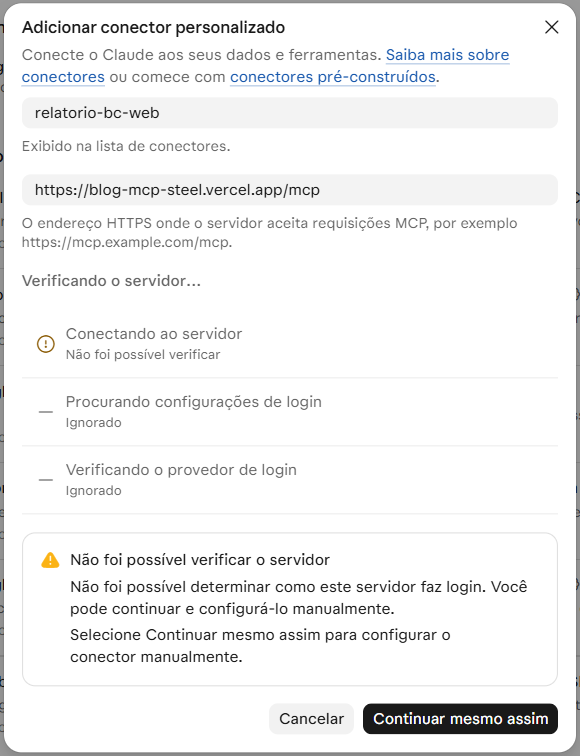
Vercel's logs had a single call from that check: a POST /mcp, which got the right answer (401, with the header that points to the sign-in metadata). Claude did not go any further. There are similar reports in Anthropic's connector issue tracker, with servers that work. We clicked Continue anyway, and from then on everything worked: Claude registered, opened the password page, got the token and listed both tools.
If it happens to you, check the metadata with a direct call (curl https://your-server/.well-known/oauth-protected-resource/mcp) before blaming your code.
Switched on does not mean used
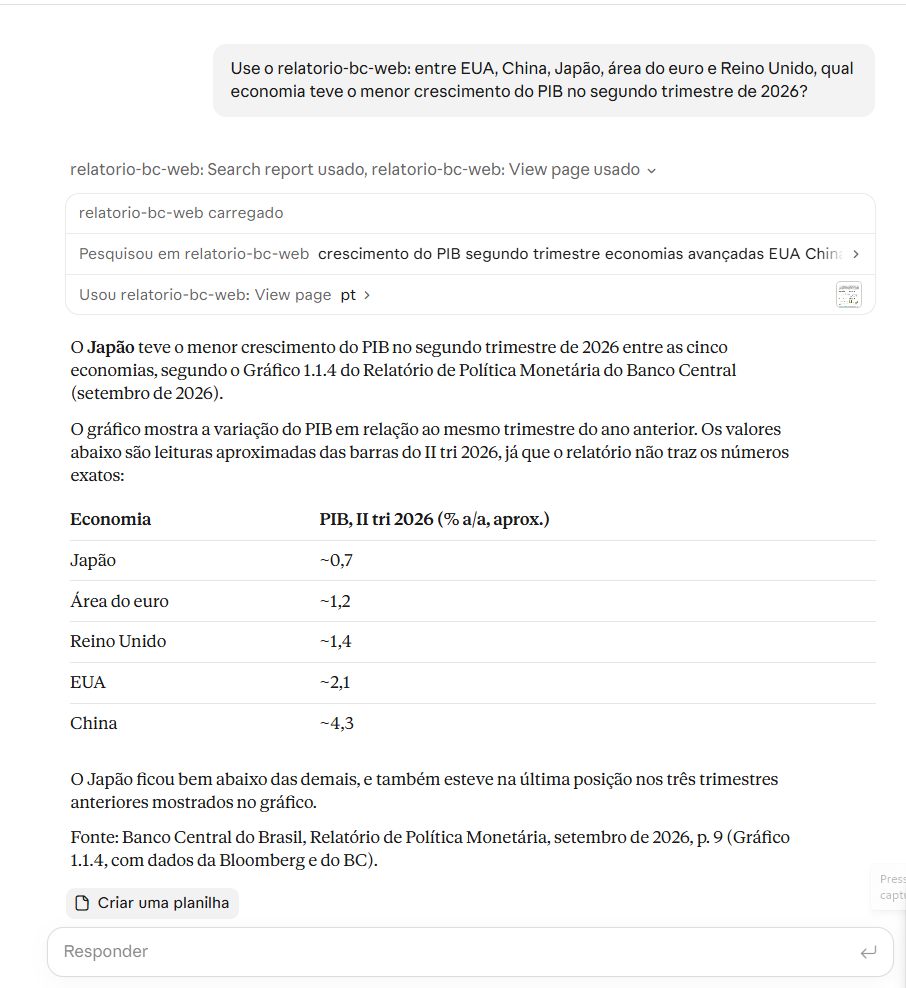
With the connector switched on, we asked the usual question: "Among the US, China, Japan, the euro area and the UK, which economy had the lowest GDP growth in the second quarter of 2026?" (in Portuguese). In three rounds, changing two things: a tool access setting and the way we asked.
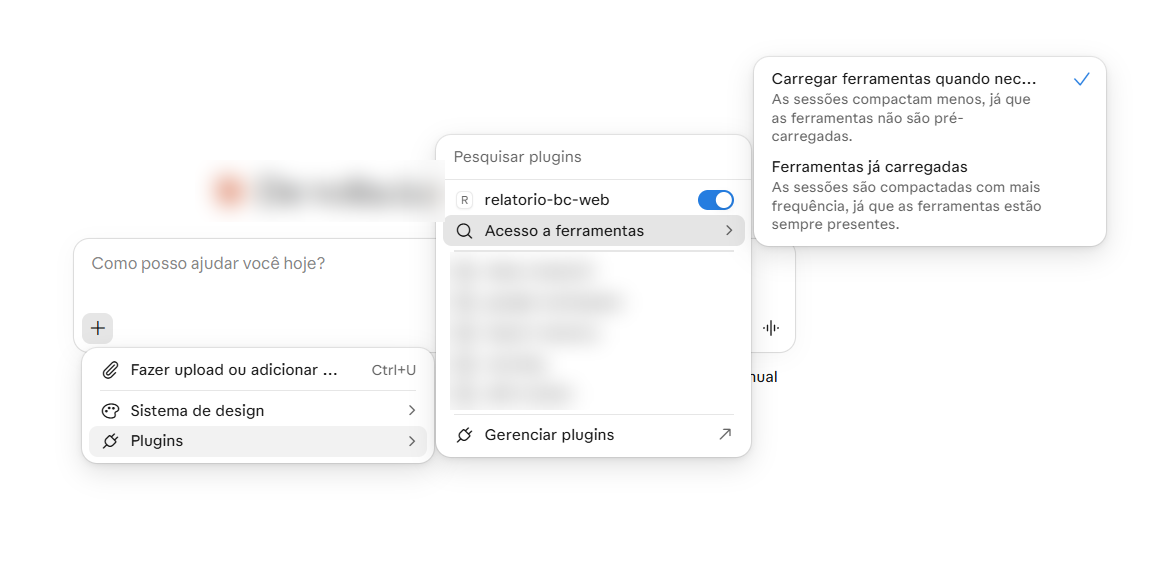
The setting comes set to load tools when needed. In that mode, Claude does not get the connectors' tools at the start of the conversation: it searches for them when it thinks it needs them. It is the same mechanism that, in Desktop, made it run nine searches before finding view_page.
| Round | Tool access | Question | What Claude used |
|---|---|---|---|
| 1 | when needed | "Use relatorio-bc-web: ..." | the connector: 1 search and page 10 |
| 2 | already loaded | the question, naming no source | web search |
| 3 | already loaded | "According to the Banco Central's Monetary Policy Report, ..." | the connector: 1 search and page 10 |
In round 1, Claude opened the right page and read the chart:
In round 2, with the tools already loaded and no source named, no call reached the server. Claude went to the web:
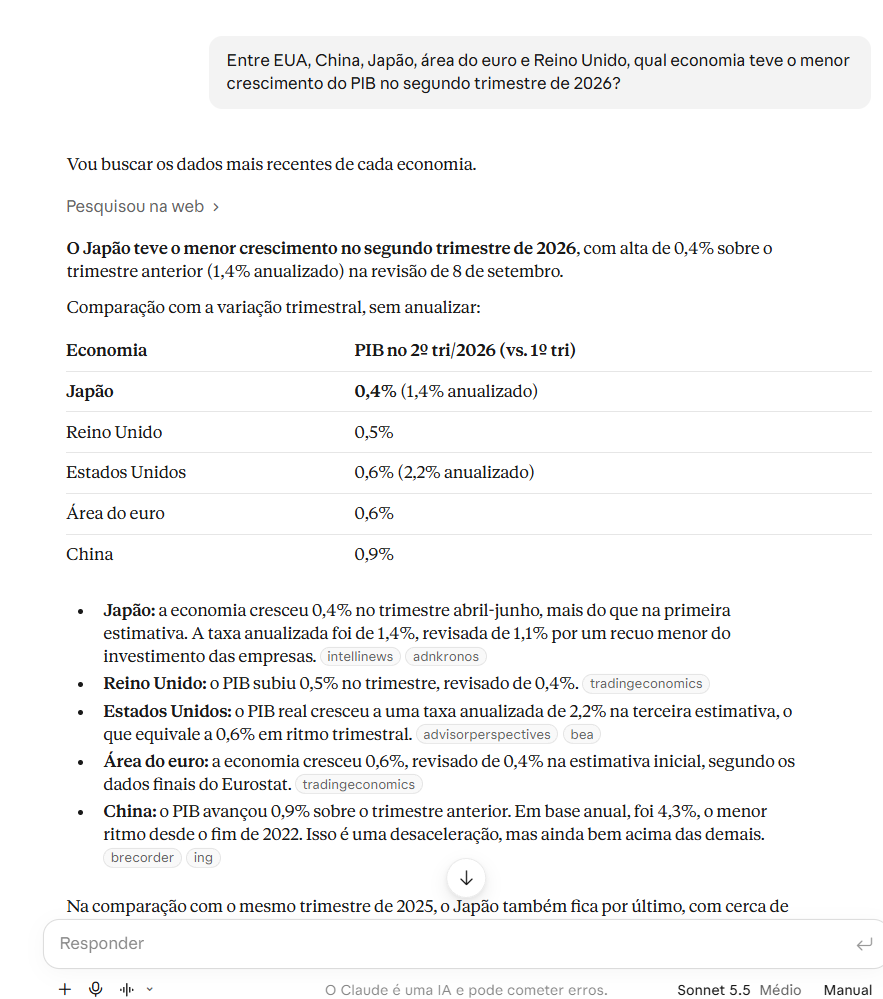
The answer was Japan as well, but on another basis: growth over the previous quarter, gathered from several websites. The report compares with the same quarter a year earlier. For a generic question about GDP, searching the web is a reasonable choice. But if you want the answer from the document, you have to say so.
In round 3, naming the report was enough, without naming the connector, and Claude used it again. The tools' description, which names the Banco Central's Monetary Policy Report, did its job.
What your coding assistant will not warn you about
The protection that only accepts localhost
When the server runs on your machine, there is an attack called DNS rebinding, in which a malicious website open in the browser tries to talk to local servers. To prevent it, the MCP SDK, by default, only accepts requests addressed to localhost. On Vercel, every request arrives addressed to the public domain, and every one would get a 421.
It makes sense as a default, but the error does not say what to do. The protection exists for local servers. On a public server, authentication is what protects you.
The disk that filled up by itself
The first question in Claude on the web ended like this:
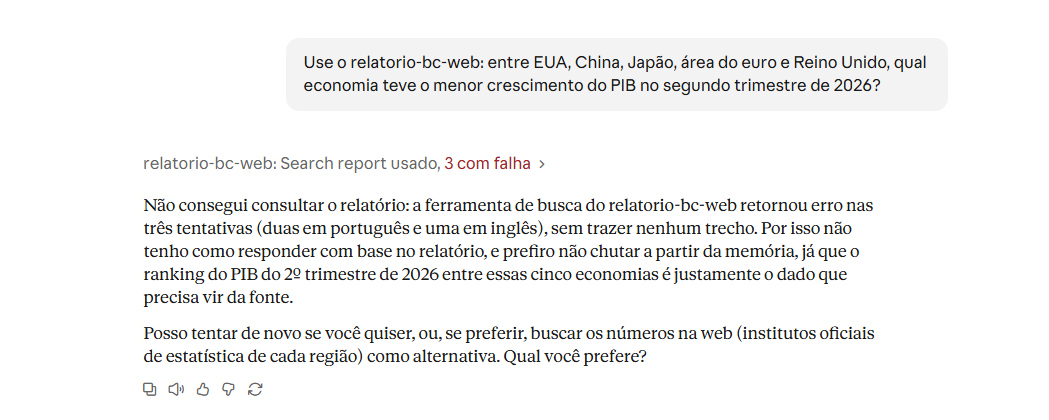
Claude behaved well: it did not make up numbers and offered to search the web. But "3 failed" gave no reason. By default, the SDK sends the model only "Error executing tool", without the cause, and nothing showed up in Vercel's logs.
To find the cause, we changed two things. Any unexpected error now goes to the log, with the traceback, and reaches the model as a short message. And every download now logs how much disk space is left. With that, the numbers showed up. Vercel installs the Python dependencies in /tmp when the function starts, the same folder where the server saved the model. With the model downloaded, 80 MB were left. In the version that failed, pymupdf 2.x also brought packages the server does not even use (pymupdf4llm, pymupdf-layout and their dependencies). The model was downloaded, and the next file, the tokenizer, never showed up in the log. We never saw the original error message, but the numbers add up: the disk ran out of space.
The fix had two parts. We pinned pymupdf to the 1.x series, which does not bring those extra packages. And we now keep the model, the tokenizer and the PDFs in memory, not on disk. Peak memory, with both editions of the PDF open, was 926 MB, within the function's 2 GB.
The wrong message was ours
On the first login attempt, the page answered "ACCESS_PASSWORD is not set on the server":
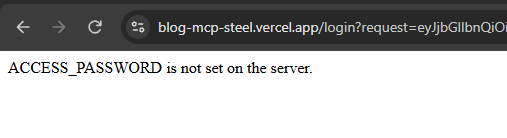
The variable was set. The problem was a password shorter than 16 characters, and the message, which we wrote, said something else. Now it says "missing or shorter than 16 characters". A wrong error message is expensive, because it sends you looking for the problem in the wrong place.
The cold start
With the server cold, the first search from Claude on the web took about 4 seconds on the server: 1.6 s to download the model, 0.4 s for the tokenizer and 1.8 s to load it. The Portuguese PDF arrived from the Banco Central in 0.1 s. In the previous post, with PyTorch, the first search took 18 to 33 seconds.
What it cost
Nothing. Vercel on the Hobby plan, Neon on the free plan, the model in a GitHub release and Claude on the free plan. On Hobby, going over the limit does not generate charges: the project stops. For a server open on the internet, that is a protection. Hobby is for non-commercial use only; for a company project, Vercel's paid plan starts at US$ 20 a month.
The server stayed up only for this post's tests. Taking it down means deleting the Vercel project, the rpm_chunks table and the rpm_reader user in the database, and the model's release.
When it is worth it
- For you, on your computer: the local server from the previous post is simpler, and the document never leaves your machine.
- To use it in the browser or on your phone, or for a small team: the server on the internet, with a password, like this one. Each person connects once.
- For sensitive documents or many people: OAuth with a real identity provider, revocable tokens and a record of who accessed what. This server's structure is a starting point, but a single password is not enough.
Either way, remember that what Claude reads leaves your server: the chunks and pages it asked for go through Anthropic to become an answer.