
In part 4 of the RAG series, the Banco Central do Brasil's Monetary Policy Report became an MCP server with two tools: search_report, which searches chunks, and view_page, which returns the page as an image. There, the server was used by an agent we wrote ourselves.
Here, the same server goes into Claude Code and Claude Desktop, with no agent to write. You ask in a chat, Claude searches the report, opens the chart's page and answers. The document stays on your machine, and the server runs for free.
We tested three ways in: Claude Code in the terminal, Claude Desktop's code tab, and Claude Desktop's regular chat. It worked in all three, but not the same way. The server, which ran fine in our agent, barely started in time. And in the Desktop chat, Claude ran nine searches before finding out it could open the page; after we rewrote one tool's description, it ran one.
The code is the series' code, at salada-dados/blog, with changes to mcp_server.py that we explain below. The screenshots are from Claude Desktop in Portuguese.
What you need
- Postgres with pgvector running in Docker, with the report's chunks loaded by
index_pg.py, as in part 4. - The Python environment (venv) with the dependencies in
requirements.txt. - Claude Code or Claude Desktop installed and signed in to your account.
No API key. Usage counts against your Claude plan.
In Claude Code
One command registers the server:
claude mcp add --env DOC_LANG=en --scope project --transport stdio relatorio-bc -- \
  "C:\Users\you\.venvs\rag\Scripts\python.exe" "C:\path\to\rag-pdf-bcb\mcp_server.py"
Everything after -- is the command that starts the server. Two things to watch:
- Absolute paths, and the venv's Python. Claude Code starts the server as a separate process, which does not inherit the venv active in your terminal. With a bare
python, it picks up the system Python, without the libraries, and the server dies on startup. - The order of the options matters. On our first try, we wrote
--scope project --transport stdio --env DOC_LANG=pt relatorio-bc, and the command replied: "Invalid environment variable format: relatorio-bc". With--envright before the name, it reads the name as one more variable. The docs warn about it; we read them afterwards.
--scope project writes the configuration to a .mcp.json in the project folder, which can go into Git and serve the whole team. For that very reason, Claude Code does not trust it right away: claude mcp list showed the server as "Pending approval", and you have to approve it once in an interactive session. A .mcp.json from someone else's repository could run any command on your machine. The other scopes are local (just you, just this project, the default) and user (you, in every project).
Inside a session, the /mcp command shows whether the server connected and which tools it offers.
You can also use it without an interactive session, allowing only the server's two tools:
claude -p "Among the US, China, Japan, the euro area and the UK, which economy had the lowest GDP growth in the second quarter of 2026?" \
  --mcp-config .mcp.json \
  --allowedTools "mcp__relatorio-bc__search_report" "mcp__relatorio-bc__view_page"
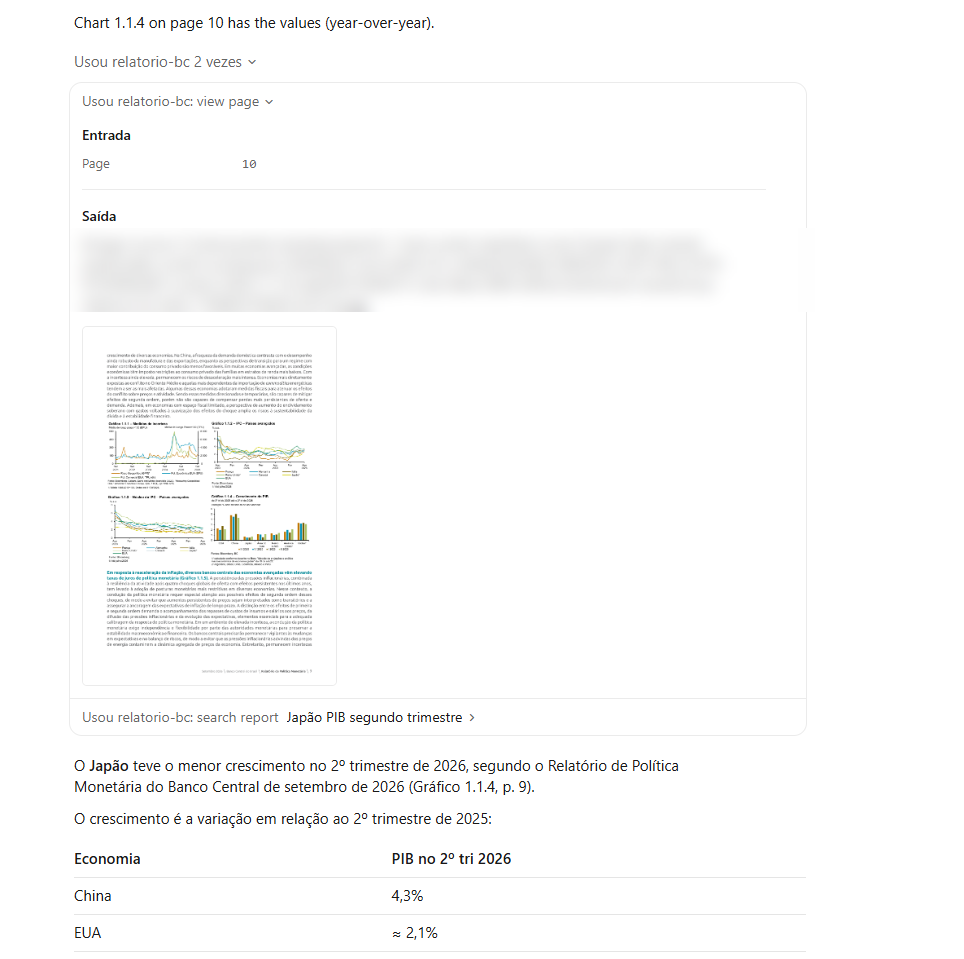
We asked in Portuguese, against the Portuguese report. Claude ran four searches, opened page 10, read Figure 1.1.4 and answered "Japan", with a table of approximate values. It even told the report's printed page number (9) apart from the PDF's page (10), and warned that Japan and the euro area were too close to call just by looking at the bars.
In Claude Desktop
Desktop reads local servers from a JSON file. The shortest way to it is Settings → Developer → Edit Config:
{
  "mcpServers": {
    "relatorio-bc": {
      "command": "C:\\Users\\you\\.venvs\\rag\\Scripts\\python.exe",
      "args": ["C:\\path\\to\\rag-pdf-bcb\\mcp_server.py"],
      "env": { "DOC_LANG": "pt" }
    }
  }
}
On Windows, every backslash in a path is doubled, because it is JSON. After saving, quit Desktop completely, including from the icon near the clock, and open it again. If it worked, the server shows up as running on the same screen:
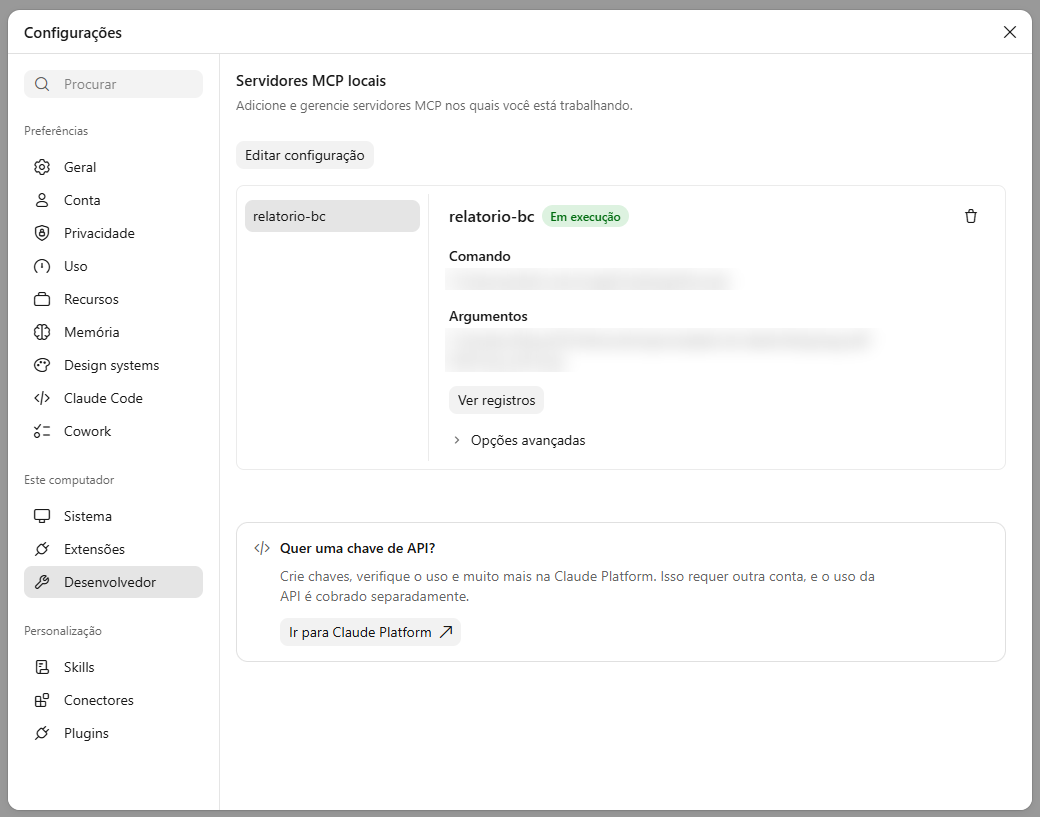
If it does not, the "View logs" button opens the server's log, with everything it wrote to stderr.
Desktop has two ways to chat, and the server works in both, with different behaviour.
In the code tab
The tab with the </> icon is Claude Code inside Desktop. The server configured in the JSON showed up there with no claude mcp add. There was no approval prompt: a notice said auto mode is Claude Code's default permission mode, in which Claude assesses each call and runs the lower-risk ones on its own.
Claude loaded both tools, searched and opened the page. The image shows up in the middle of the conversation:
In the regular chat
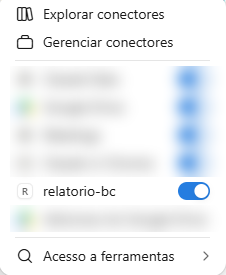
In the regular chat, the server becomes a connector, with an on/off switch in the message box's menu:
Here, each tool asks for permission before its first use:
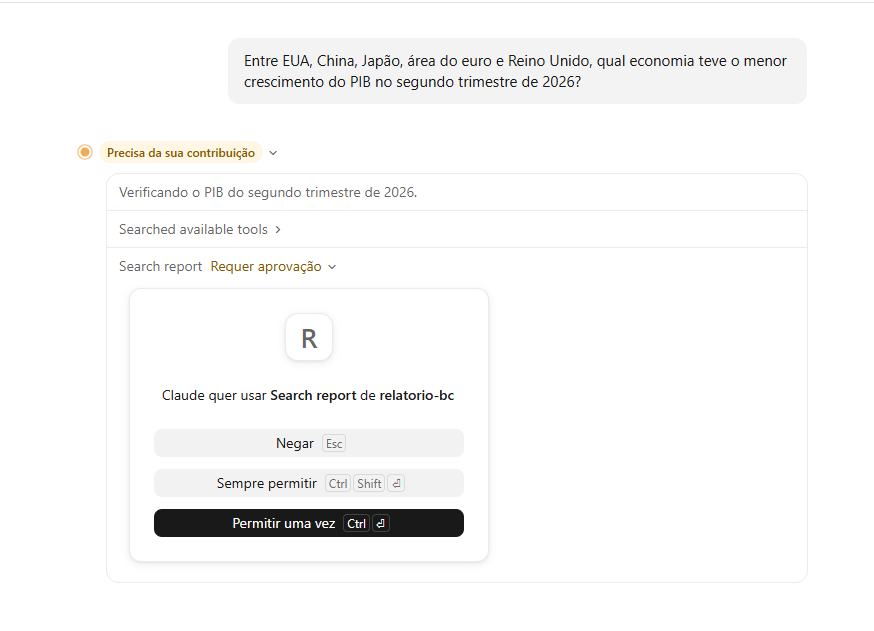
We marked both tools as read-only in the server (read_only_hint), and the prompt showed up all the same. In Claude Code, that annotation only makes Claude run read-only calls in parallel; it does not skip your approval. That makes sense: the one claiming the tool only reads is the server, and the server could be lying.
The answer was right, with the same care to separate the figures the report's text gives on different bases:
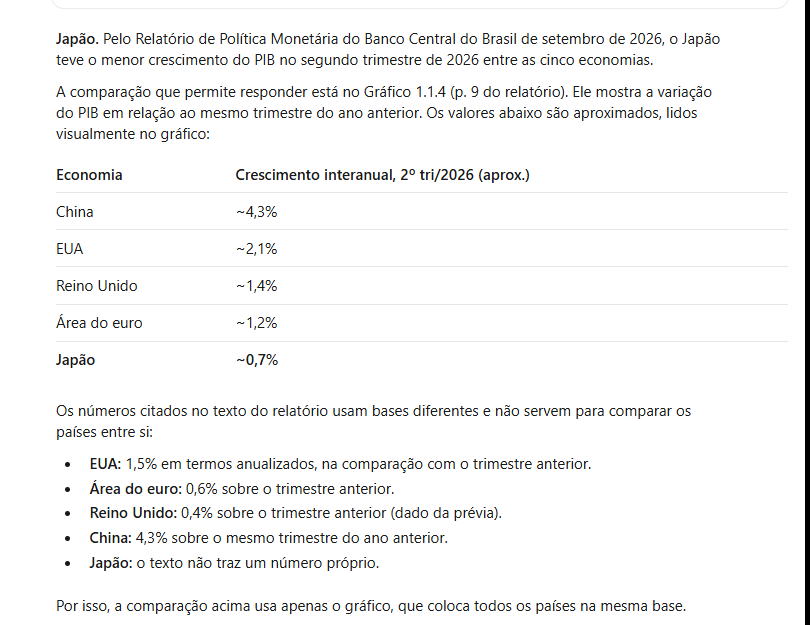
But the road there was long. Here is what came before.
Nine searches before opening the page
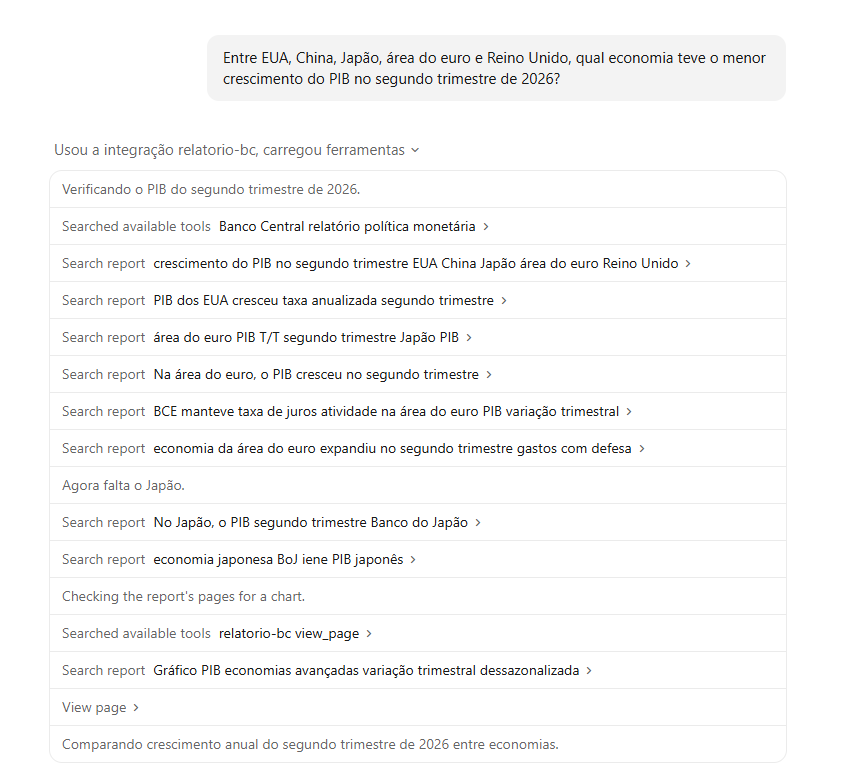
In the regular chat, Claude ran 9 searches in the report before opening the chart's page. It looked for each country's GDP in the text, one by one, and only then looked for another tool and found view_page.
The reason is in one line of the list: "Searched available tools". Claude does not get every tool at once. It searches for the ones it needs, by keyword, and only then do they join the conversation. The first search was for "Banco Central relatório política monetária" (central bank, monetary policy report). Judging by what came next, it brought only search_report, whose description mentions the Banco Central do Brasil's Monetary Policy Report. The view_page description talked about returning a page "of the report" as an image, without naming the central bank or monetary policy. It was left out until Claude searched again, near the end.
In the code tab, Claude loaded both tools at once and opened the page on its second call. Same question, same server, very different paths.
In part 4, we showed that a tool's description changes how the model uses it. Here, it also decides whether the model finds the tool.
So we fixed the two things Claude reads before using the server. The view_page description now names the report, in English and in Portuguese, and says the tool goes together with the search. And the server's instructions field, which used to say only "Read-only access to one PDF report", now explains how the two tools fit together:
"view_page": (
    f"Return one page (1 to {len(doc)}) of the Banco Central do Brasil's Monetary Policy Report "
    "(Relatório de Política Monetária, September 2026) as an image. Use it to read a chart "
    "(gráfico) or a table (tabela) on a page that search_report found: the values of charts "
    "are only in the image. Load it together with search_report."
),

INSTRUCTIONS = (
    "Read-only access to the Banco Central do Brasil's Monetary Policy Report (Relatório de Política "
    "Monetária, September 2026). Two tools work together: search_report finds the pages, and view_page "
    "shows a page as an image. Chart values exist only in the image, so after a search that points to "
    "a chart or a table, call view_page on that page."
)
We restarted Desktop and asked the same question in a new chat:
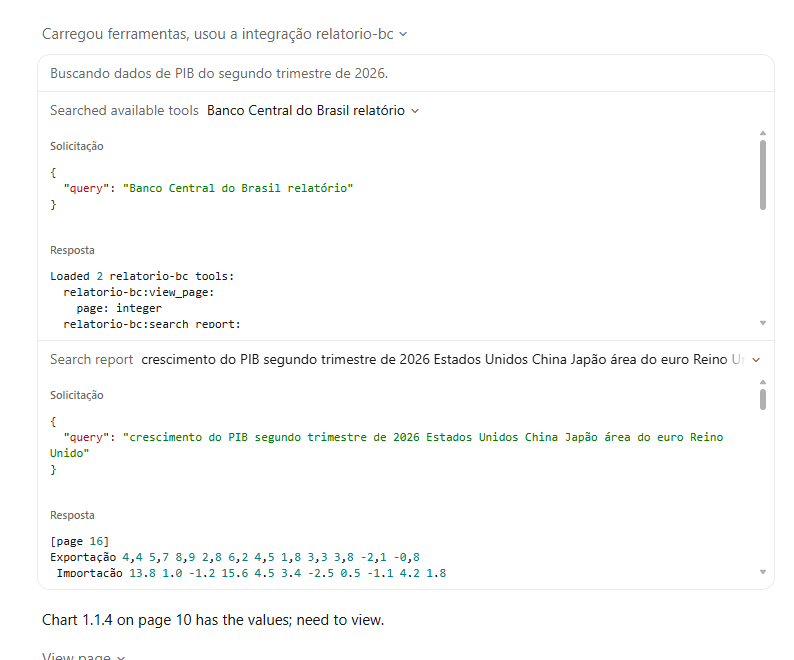
The tool search brought both at once ("Loaded 2 relatorio-bc tools"). Claude ran one search, opened page 10 and answered with the same values as before. From 9 searches to 1.
That is one run before and one after, not a measurement: the model does not always answer the same way, and the tool search itself used other words the second time. But the cause is clear, and the fix cost two paragraphs of text. If your server has more than one tool, write each description with the person who will search for it in mind, not just the one who will use it.
What your coding assistant will not warn you about
The server took longer to start than the client would wait
We timed how long it took from starting the server to listing its tools: 28 to 40 seconds. Almost all of it was importing PyTorch and loading the embedding model, which the server did on startup. Claude Code waits 30 seconds for a server (you can raise it with the MCP_TIMEOUT variable). In our tests, the connection made it, but only just: on a slower computer, or on the first run, with the model still downloading, it would not.
In part 4's agent, this never showed up, because the code waited as long as it took. The fix was to load the model on the first search, not on startup:
@cache
def embedder():
    """Loaded on the first search, not at startup: importing PyTorch and loading the model takes
    30 s or more, and MCP clients give a server about that long to start (30 s in Claude Code)."""
    from sentence_transformers import SentenceTransformer
    return SentenceTransformer("intfloat/multilingual-e5-small")
The server now starts in 2 to 3 seconds. The cost moved to the first search, which now takes 18 to 33 seconds; the following ones are instant.
Reading a chart is approximate, and it varies
We asked the same question three times. Japan came out lowest every time. But the euro area was read as about 0.7% in Claude Code in the terminal and about 1.2% in both Desktop chats. Only China's figure (4.3%) is written in the text; the others come from the bars.
Claude warned about this in all three answers, which is good. But if the decision depends on the second decimal place, a chart is not a source. Look for the table or the original series.
print() breaks the server
Worth repeating, because in Desktop it is harder to track down: with the stdio transport, standard output is the protocol channel. A debugging print() in the server turns into garbage in the middle of the conversation. Logs go to stderr, and Desktop shows that log under the "View logs" button.
A coding assistant is an expensive PDF reader
In -p mode, Claude Code reports what the session would cost at API prices. The Japan question, on the default model, came to US$ 0.70. With Sonnet, a table question came to US$ 0.45. Our lean agent in part 4 spent US$ 0.024.
The difference is not the PDF. Claude Code brings to every call its own system prompt, dozens of programming tools and the whole history, which added up to more than 250,000 tokens read from the cache for a single question. On a subscription, you do not pay per call, but it eats into your usage limit. To look something up in a document now and then, that is fine. For hundreds of questions a day, your own agent is far cheaper.
When to use each
- Claude Desktop, regular chat: the simplest way to look things up in the document day to day. It asks for approval per tool, and you see every search.
- Claude Code or the code tab: useful when the lookup is part of bigger work, like writing a report from the document. The
.mcp.jsonin the project leaves the setup ready for the team. - Your own agent, like part 4's: when the volume is high, the cost has to be predictable or the answer goes to another system.
In all three cases, the document and the database stay on your machine. What leaves is what the model reads: the chunks and the pages it asked for.
What's next
This server only works where Claude runs on your machine. Claude in the browser and on mobile accepts MCP servers as connectors, but they have to be on the internet, with HTTPS and authentication. Taking this server there, with the cost and the risks measured, is the next post.